

Open-Source OCR: dots-ocr Beats Giants in 2025
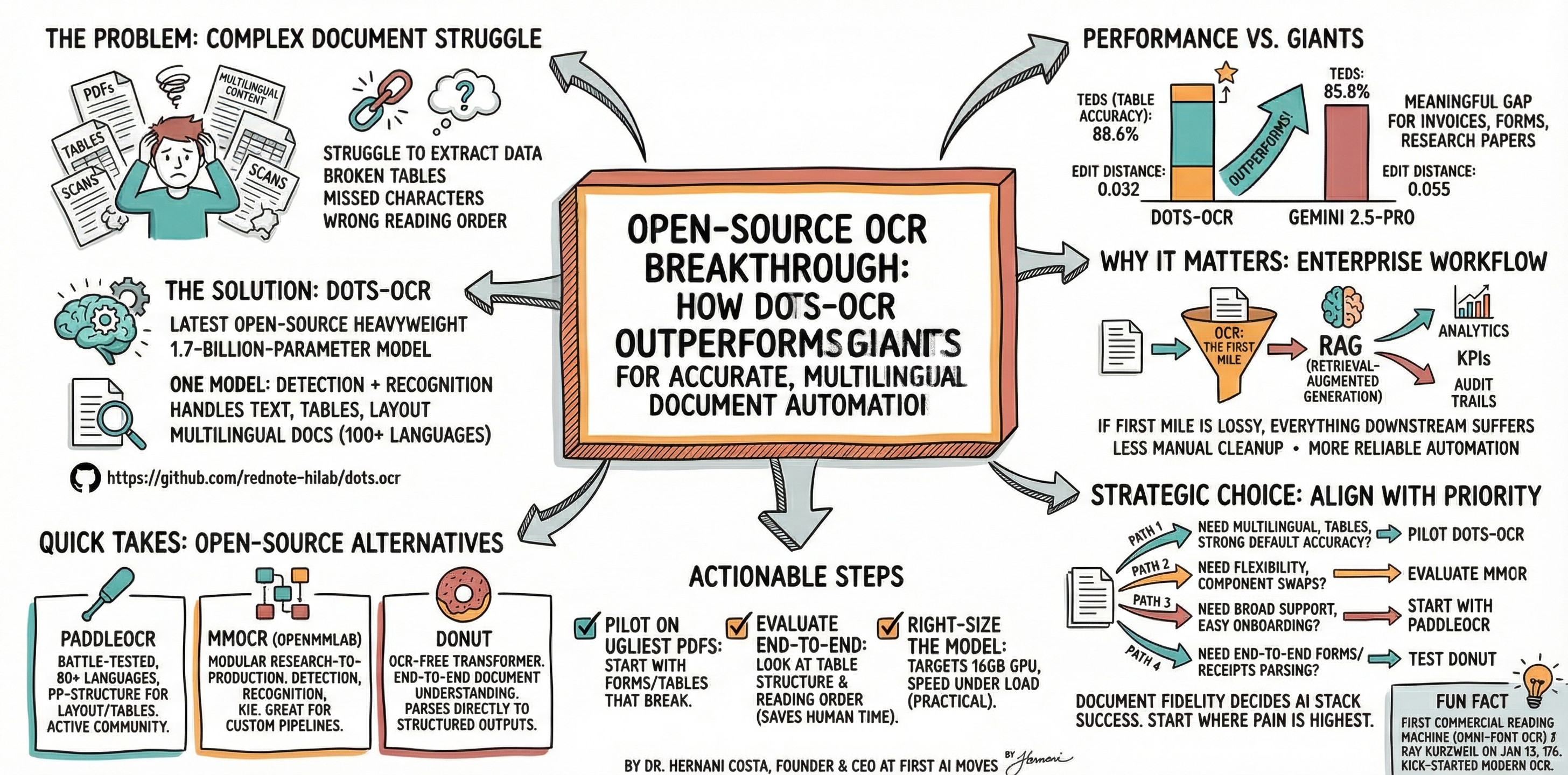
Quick Take: New open-source OCR model dots-ocr achieves 88.6% table accuracy vs 85.8% for Gemini 2.5-Pro. This breakthrough delivers enterprise-grade multilingual document processing with faster inference and better structure recognition.
Open-Source OCR Breakthrough: How dots-ocr Outperforms Giants for Accurate, Multilingual Document Automation
TL;DR: Discover how dots-ocr achieves 88.6% table accuracy vs 85.8% for Gemini 2.5-Pro. Open-source OCR breakthrough for multilingual document automation.
By Dr. Hernani Costa — Aug 19, 2025
Discover how dots-ocr delivers enterprise-grade accuracy, efficiency, and language versatility for modern document processing workflows.
Do you struggle to extract data from complex PDF documents? dots-ocr, the latest open-source heavyweight, is setting new benchmarks for accuracy and speed—beating industry leaders on tables, text, and multilingual content. Unlock less manual work and smarter automation by upgrading your OCR stack today.
Hello and welcome to today's edition of First AI Movers Newsletter—your daily five‑minute brief on what matters in AI. Let's dive into the lead story and why it's a practical win for anyone wrangling PDFs, scans, and multilingual documents at work.
Lead Story — Everyone's sleeping on dots‑ocr (don't)
What happened: A new open‑source vision‑language model, dots‑ocr, quietly landed on GitHub with standout results for document parsing. It's a 1.7‑billion‑parameter model designed to handle text, tables, and layout—one model for detection and recognition—and it's built for multilingual docs. The kicker: on the OmniDocBench table benchmark, dots‑ocr posts 88.6 percent TEDS (a structural table accuracy metric) versus 85.8 percent for Gemini 2.5‑Pro; on text accuracy, its edit distance is 0.032 compared with 0.055 for Gemini 2.5‑Pro. That's a meaningful gap if your world revolves around invoices, statements, research papers, or forms.
Why it matters: In enterprise workflows, OCR is still the first mile. If the first mile is lossy—missed characters, broken tables, wrong reading order—everything downstream (RAG, analytics, KPIs, even audit trails) suffers. A small, fast model that lifts accuracy across 100‑language PDFs and images means less manual cleanup and more reliable automation, especially for globally distributed teams with mixed document types.
What to do with it:
- Pilot on your ugliest PDFs. Start with forms and tables that usually break. Compare dots‑ocr output to your current stack.
- Evaluate end‑to‑end, not just character error rate. Look at table structure and reading order—that's what saves human time.
- Right‑size the model. Dots‑ocr targets 16‑GB GPU inference and emphasizes speed under load, which is practical for on‑prem or cost‑sensitive cloud runs.
My take: This is the kind of open‑source step‑function that sneaks up on teams still treating OCR as "good enough." If your RAG or analytics feels flaky, check your document ingestion fidelity first. Better OCR can be a cheaper fix than jumping to a bigger LLM.
Meanwhile, if you're choosing your stack or planning a bake‑off, here are three credible open‑source alternatives to test side‑by‑side…
Quick Takes — Open‑source alternatives to try
- PaddleOCR — Battle‑tested, production‑grade library with 80+ languages, strong detection and recognition models, plus the PP‑Structure pipeline for layout and tables. Good docs, lots of pretrained weights, and an active community.
- MMOCR (OpenMMLab) — A modular research‑to‑production toolkit that covers detection, recognition, and key information extraction under one roof. Great if you want to swap backbones, run ablations, or build custom pipelines at scale.
- Donut — An OCR‑free transformer for end‑to‑end document understanding. Instead of stitching together detector and recognizer, Donut parses docs directly to structured outputs (forms, receipts, etc.). Useful for complex layouts.
How I'd choose: If you want fast wins with broad language coverage and tables, start with dots‑ocr or PaddleOCR. If you're building custom research pipelines or adding KIE, try MMOCR. If your documents are templated or form‑heavy, give Donut a shot.
Fun Fact
The first commercial reading machine—a full print‑to‑speech system built on omni‑font OCR—was introduced by Ray Kurzweil on January 13, 1976. It even read Walter Cronkite's nightly sign‑off on TV during the demo. The device was a milestone for accessibility and kick‑started modern OCR.
Conclusion
No single OCR stack has won the "standard" mantle, and they may coexist, serving different niches. Near term, align your choice with your strategic priority:
- Need multilingual, tables, and strong default accuracy, with simple ops, pilot dots‑ocr.
- Need maximum flexibility and component swaps, evaluate MMOCR.
- Need broad community support, easy onboarding, start with PaddleOCR.
- Need end‑to‑end parsing for forms and receipts, test Donut.
It's an exciting phase—akin to the early days of search—where document fidelity quietly decides how far your AI stack can go. The savvy move is to start where the pain is highest and keep your pipeline modular so you can swap models as the ecosystem evolves.
If you require strategic consultation on AI readiness assessment or document intelligence implementation, feel free to contact me at [email protected]
Originally published at First AI Movers. Written by Dr. Hernani Costa, Founder and CEO of First AI Movers.
Subscribe to First AI Movers for daily AI insights and practical automation strategies for EU SME leaders. First AI Movers is part of Core Ventures.
Ready to automate your business? Book a call today!
About the author
- PhD in Computational Linguistics. I build the operating systems for responsible AI. Founder of First AI Movers, helping companies move from "experimentation" to "governance and scale." Writing about the intersection of code, policy (EU AI Act), and automation.
Comments
Join the discussionNo comments yet. Be the first to comment.




